Cyberpunk 2077 on the HP Omen Max 16: RTX 5070 Ti Mobile vs RTX 5080 Mobile at 4K
The HP Omen Max 16 is one of the most capable gaming laptops you can buy right now, and it's available with both NVIDIA's RTX 5070 Ti Mobile and RTX 5080 Mobile GPUs. I put both configurations through their paces in Cyberpunk 2077's built-in benchmark at 4K to see how far you can push ray tracing, DLSS upscaling, and the new Multi Frame Generation technology on each GPU.
Both configurations share the same Intel Core Ultra 7 255HX processor, 16GB of system RAM, and Windows 11 Home. The only difference is the GPU — making this a clean comparison of what an extra tier of graphics silicon buys you in one of the most demanding PC games available.
Test Setup
| Component | Spec |
|---|---|
| Laptop | HP Omen Max 16 |
| CPU | Intel Core Ultra 7 255HX |
| RAM | 16 GB |
| OS | Windows 11 Home |
| GPU (Config A) | NVIDIA GeForce RTX 5070 Ti Laptop GPU (12 GB) |
| GPU (Config B) | NVIDIA GeForce RTX 5080 Laptop GPU (16 GB) |
| Resolution | 3840 x 2160 (4K), Fullscreen |
| Texture Quality | High |
| Benchmark | Cyberpunk 2077 built-in benchmark |
All tests used the Custom preset with High texture quality unless otherwise noted. Ray tracing settings (when enabled) included ray-traced sun shadows, local shadows, and medium ray-traced lighting, with reflections and path tracing disabled — a realistic "RT medium" configuration that adds depth without the full path-tracing tax.
RTX 5070 Ti Mobile: DLSS Modes Without Frame Generation
The first set of tests isolates the effect of DLSS upscaling quality on the RTX 5070 Ti Mobile at native 4K with ray tracing enabled and no frame generation.
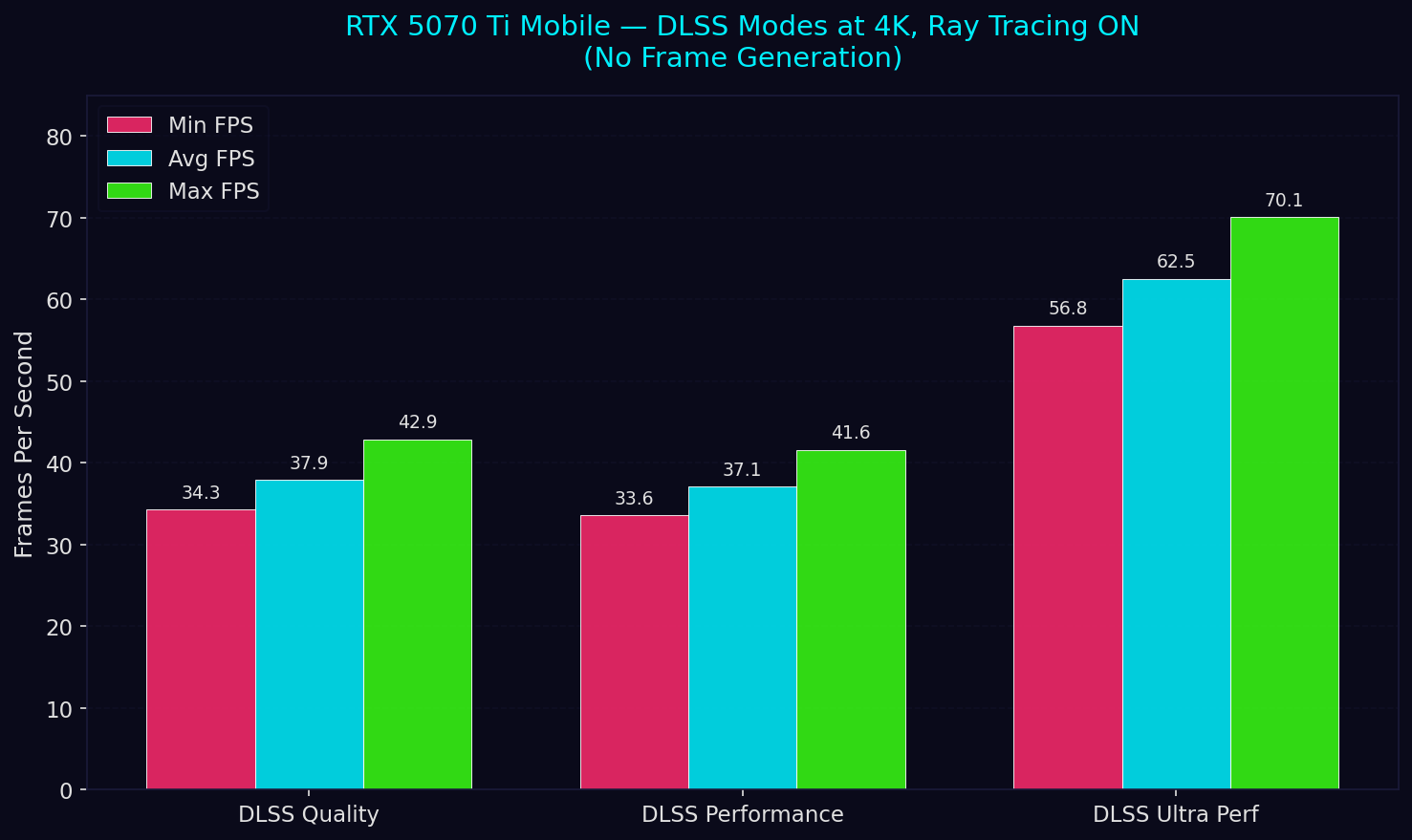
At DLSS Quality and Performance modes the 5070 Ti Mobile hovers around 37–38 FPS average — playable in a cinch, but not smooth. The real jump comes at DLSS Ultra Performance, which nearly doubles the average to 62.5 FPS by rendering at a much lower internal resolution. If you're willing to accept the softer image, Ultra Performance makes 4K ray tracing genuinely viable on this GPU.
The Ray Tracing Tax
How much does ray tracing actually cost? Using DLSS Ultra Performance as the control, I ran the benchmark with ray tracing on and off.
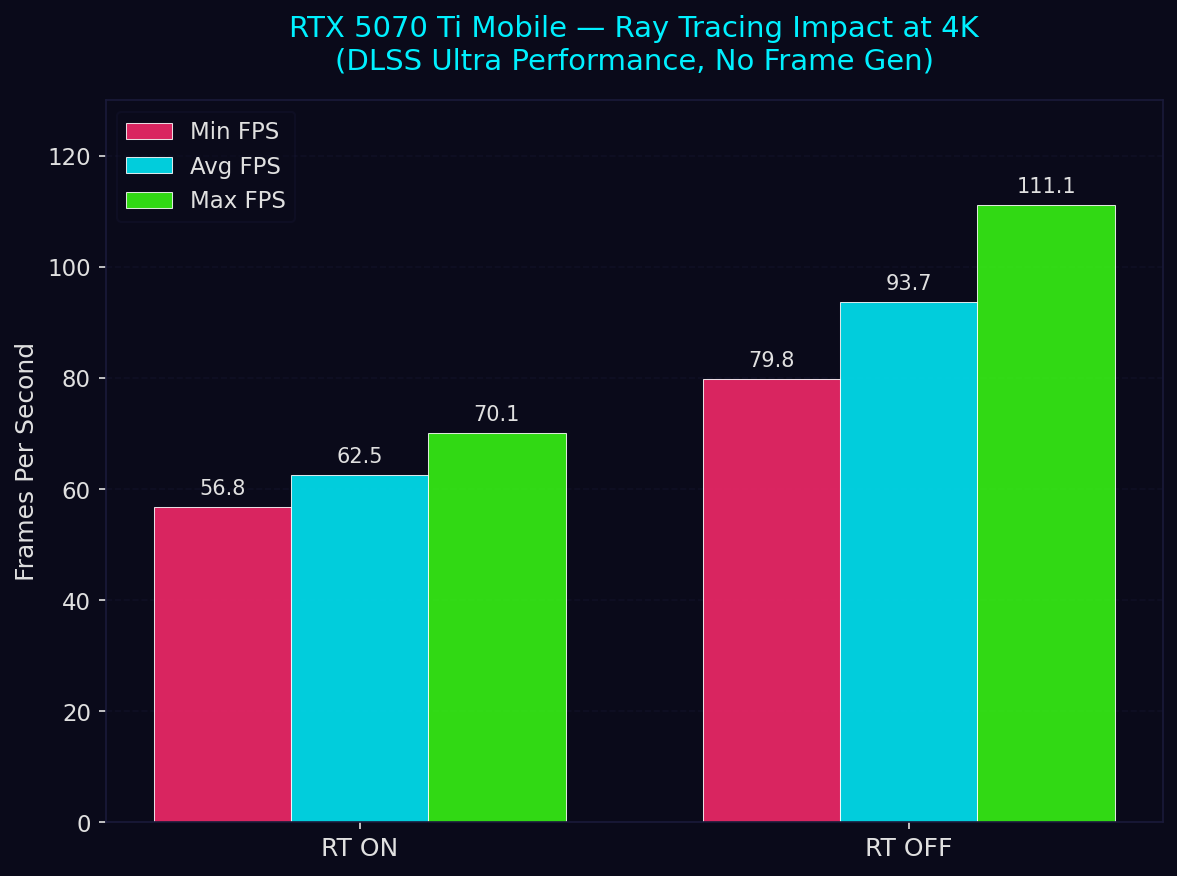
Turning off ray tracing entirely boosts the average from 62.5 FPS to 93.7 FPS — a 50% improvement. The minimum FPS jumps from 56.8 to 79.8, which means consistently smoother gameplay. This is the classic RT trade-off: those ray-traced shadows add real visual depth, but the performance cost at 4K is substantial even with aggressive DLSS upscaling.
Multi Frame Generation 2X: The Game Changer
NVIDIA's Multi Frame Generation (MFG) is the marquee feature of the RTX 50-series. By generating additional AI-interpolated frames, it can dramatically boost perceived smoothness. Here's how the 5070 Ti Mobile performs with MFG 2X enabled across different DLSS quality levels, all with ray tracing on.
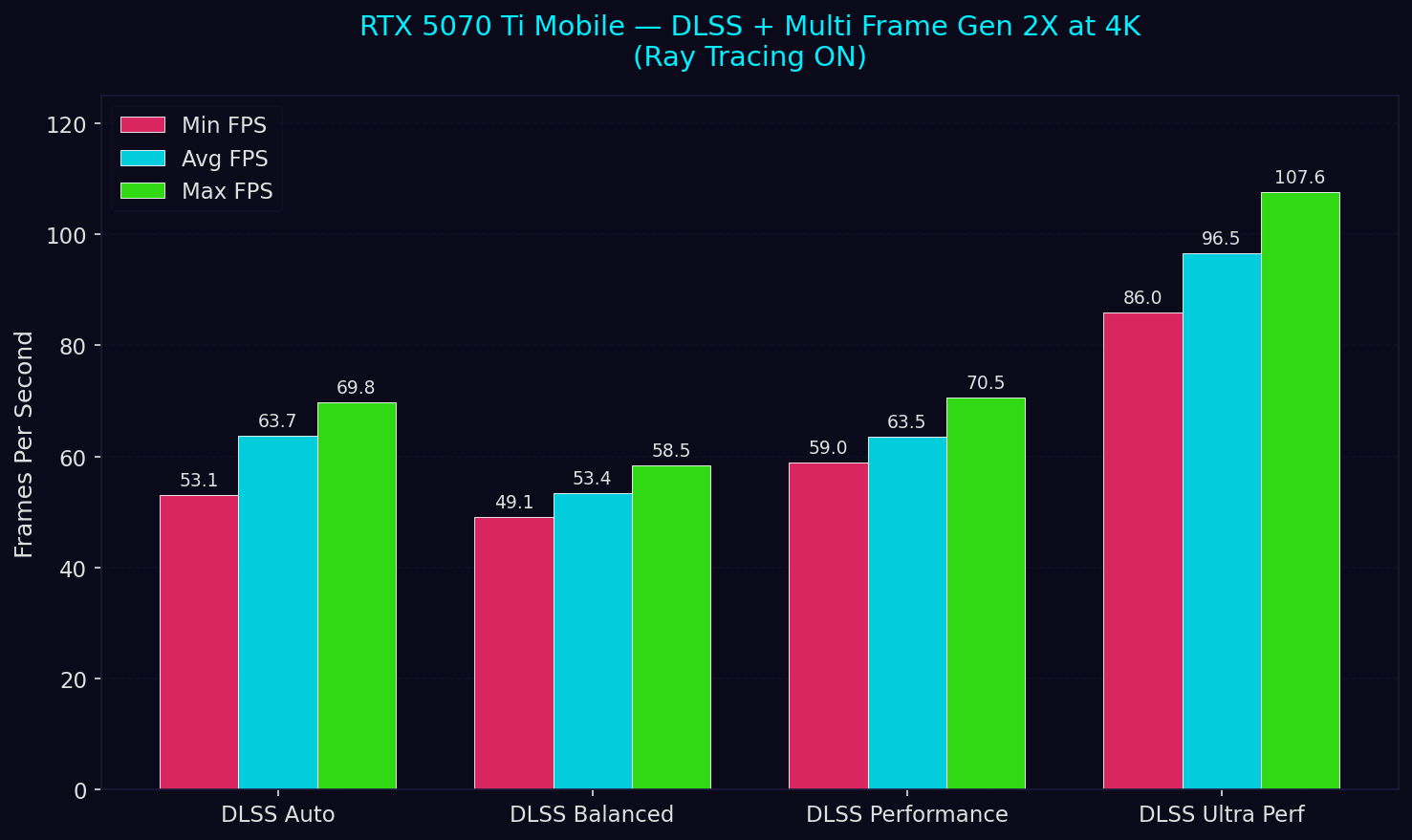
MFG 2X transforms the experience. DLSS Auto and Performance both land around 63–64 FPS average, while Ultra Performance pushes past 96 FPS — putting buttery-smooth 4K ray-traced gameplay within reach of the 5070 Ti Mobile. The Balanced result (53.4 FPS) sits a bit lower, likely because the DLSS Balanced preset renders at a higher internal resolution than Auto selected in this scene.
Compared to the non-MFG results, turning on MFG 2X with DLSS Ultra Performance boosts the average from 62.5 to 96.5 FPS — a 54% uplift from frame generation alone.
Pushing It: Multi Frame Generation 4X
MFG 4X doubles the interpolation, generating three AI frames for every rendered frame. With DLSS set to Auto and ray tracing enabled, the 5070 Ti Mobile hits a remarkable 107.2 FPS average at 4K with ray tracing.
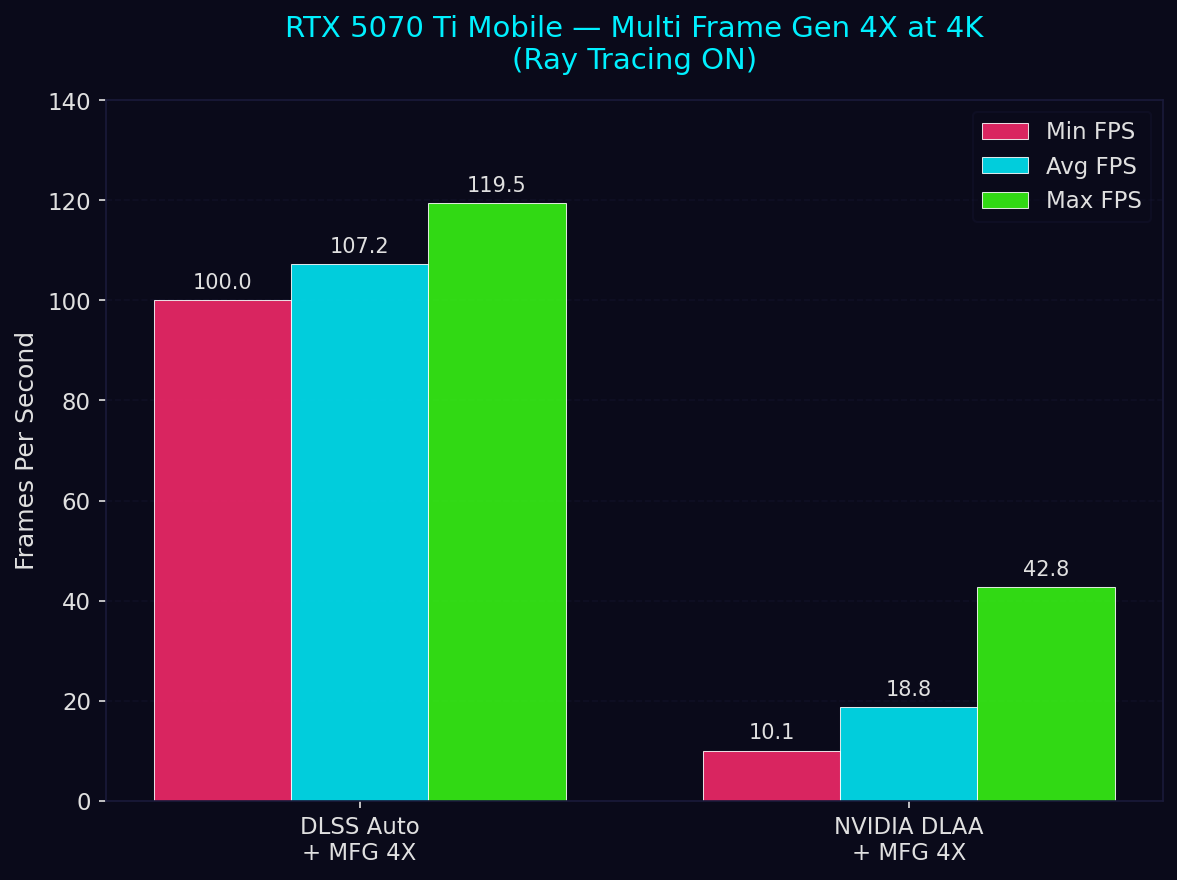
I also tested NVIDIA DLAA (native resolution, no upscaling) with MFG 4X as an extreme scenario. As expected, rendering at full 4K with no upscaling assistance crushed the GPU down to 18.8 FPS average — MFG 4X can't save you if the base frame rate is in the single digits. This confirms that DLSS upscaling and MFG are designed to work together; one without the other at 4K isn't practical with ray tracing enabled.
RTX 5080 Mobile: Stepping Up
The RTX 5080 Mobile brings more CUDA cores, more VRAM (16 GB vs 12 GB), and higher power limits. Here's how it performed at 4K.
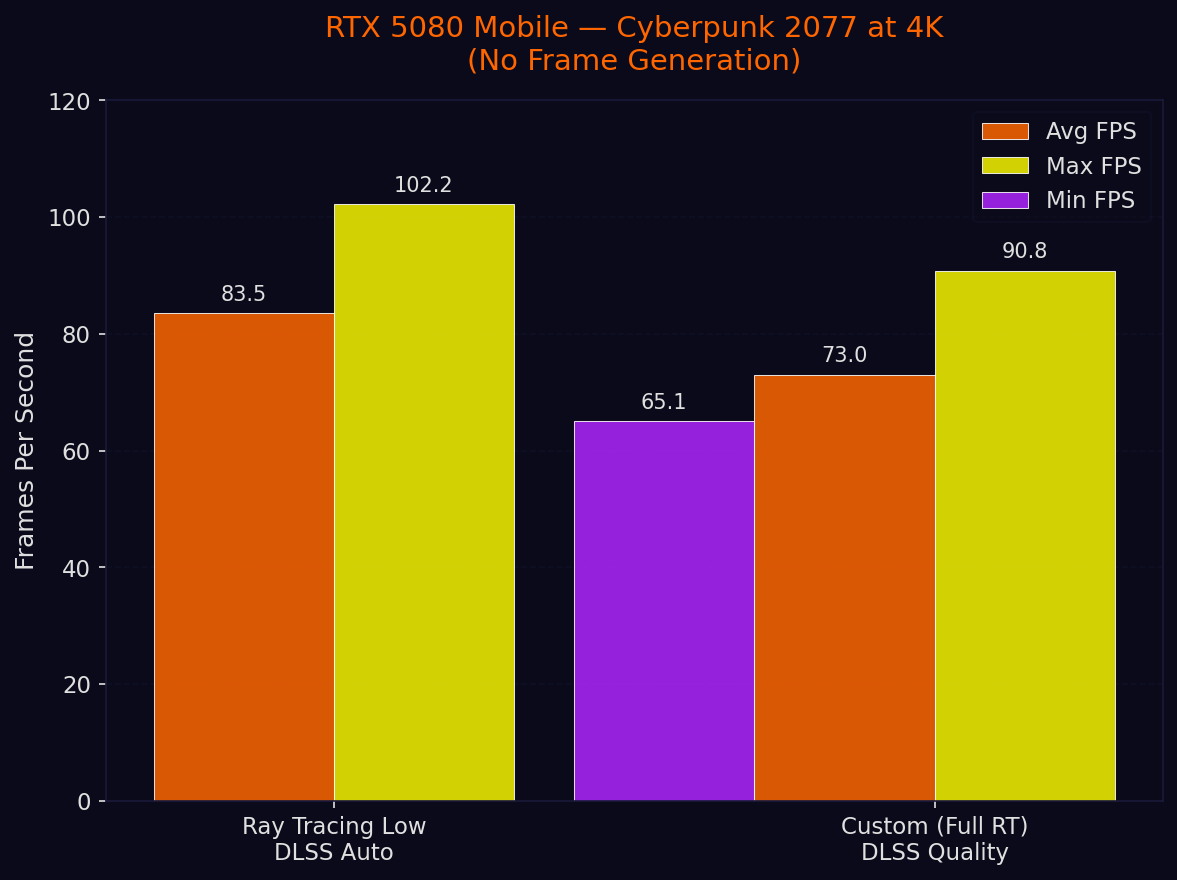
With the Ray Tracing Low preset and DLSS Auto, the 5080 Mobile averaged 83.6 FPS — comfortably above the 60 FPS target without any frame generation needed. Switching to a custom config with full ray tracing (reflections, sun shadows, local shadows, and lighting all enabled) and DLSS Quality mode, it still managed 73.0 FPS average with a healthy 65 FPS floor.
For context, the 5070 Ti Mobile needed DLSS Ultra Performance plus MFG 2X to hit similar frame rates with a less demanding RT configuration. The 5080 Mobile does it natively with higher-quality DLSS and more RT features enabled.
The Full Picture
Here's every configuration side by side, sorted by GPU and setting complexity.
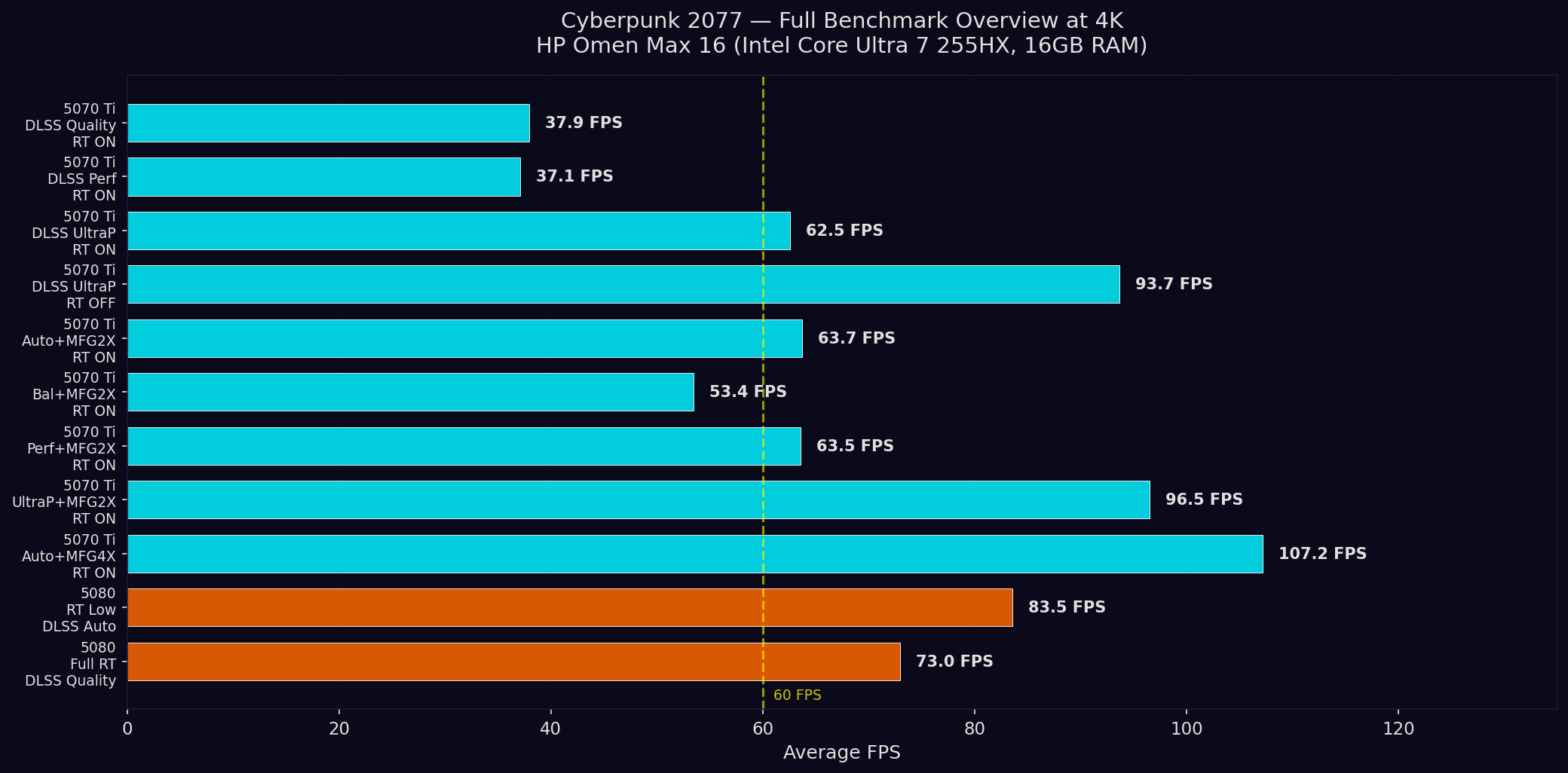
A few takeaways from the full overview:
The RTX 5070 Ti Mobile is a capable 4K GPU — with the right settings. Without frame generation, you'll want DLSS Ultra Performance to stay above 60 FPS with ray tracing. Enable MFG 2X and the options open up considerably; MFG 4X with DLSS Auto even cracks 107 FPS.
The RTX 5080 Mobile handles 4K ray tracing with less reliance on frame generation. It delivers 73–84 FPS at 4K with ray tracing and no frame generation at all, landing in the sweet spot where the game feels smooth and responsive. Adding MFG would push it well past 100 FPS.
DLSS mode matters more than you might think. On the 5070 Ti Mobile, the jump from Quality/Performance to Ultra Performance is massive (37 → 63 FPS). The lower DLSS modes barely differ from each other at this resolution, suggesting the GPU is bottlenecked elsewhere at those internal render targets.
MFG is transformative but not magic. It needs a solid base frame rate to work with. The DLAA + MFG 4X test proves that even aggressive frame generation can't compensate for a base render rate below ~20 FPS.
Which GPU Should You Pick?
If you're targeting 4K gaming with ray tracing on the HP Omen Max 16, the RTX 5080 Mobile is the more comfortable choice — it delivers playable frame rates without leaning on frame generation, giving you headroom to crank up ray tracing features and DLSS quality. The RTX 5070 Ti Mobile is no slouch, but it needs the DLSS and MFG toolkit working overtime to match what the 5080 Mobile achieves more naturally. For gamers playing at the laptop's native resolution (2560 x 1600) rather than 4K, the 5070 Ti Mobile would be an excellent choice that saves some money while still delivering a premium experience.
Benchmarks performed using Cyberpunk 2077's built-in benchmark tool. All tests at 3840 x 2160 (4K), High texture quality, Custom preset. Results may vary with driver updates, game patches, and thermal conditions.